


Case study · AI workflow automation · Construction
10–15 hours a week back for a New Brunswick general contractor
Every approved invoice was typed twice, once in Procore and again in Sage 300, and early budgets were priced by digging through old jobs. We connected the two systems and built an AI estimating agent that prices budgets from the company's own past projects.
About the Client
A general contractor and construction manager in southeast New Brunswick, building commercial projects such as offices, clinics and dealerships. Projects run in Procore and accounting runs in Sage 300. The preconstruction team prices new opportunities from drawings, specifications and the cost history of past jobs.
The Challenge
Invoices entered twice
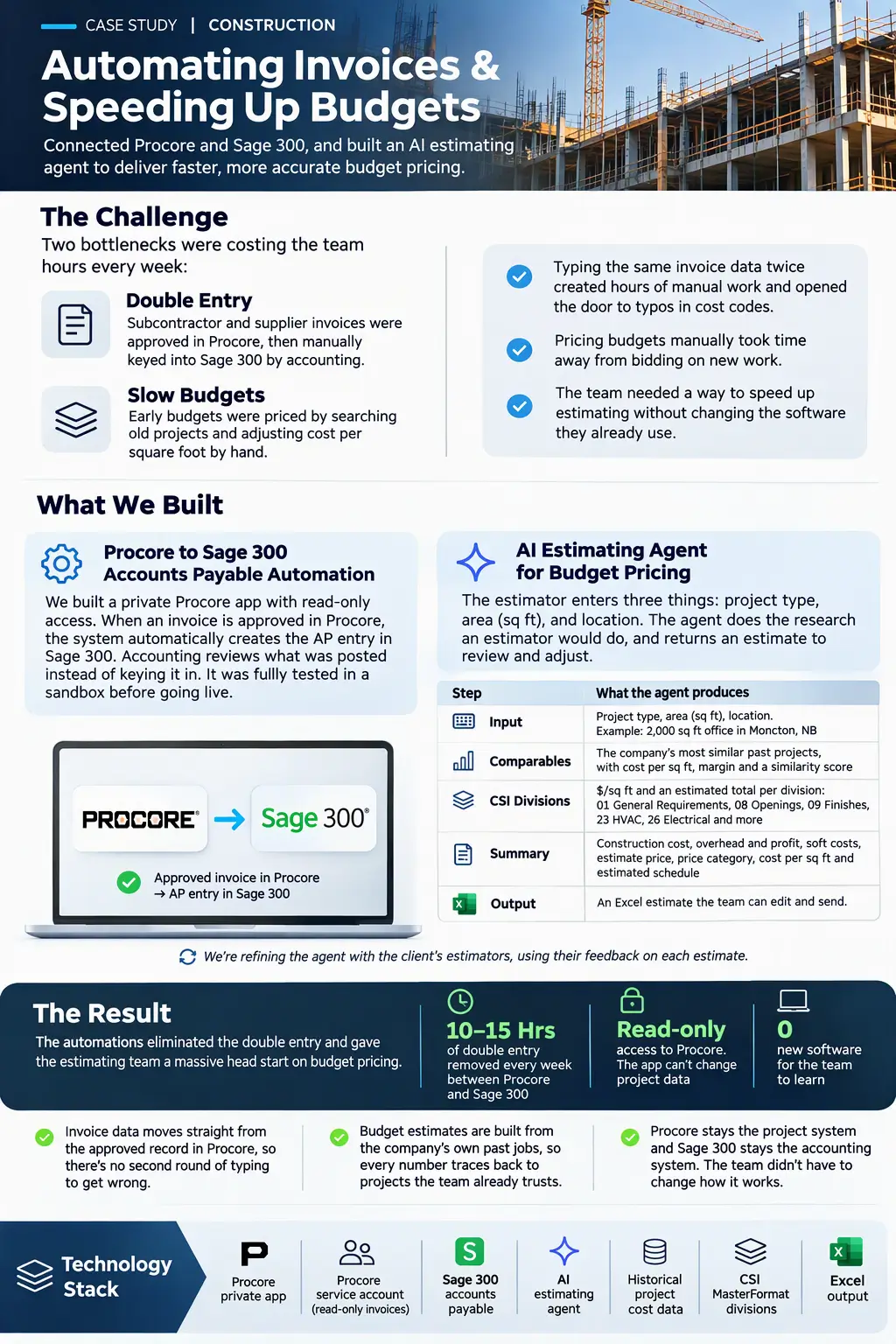
Subcontractor and supplier invoices were approved in Procore, then someone in accounting keyed each one into Sage 300 accounts payable. Same vendor, same amount, same job. Hours every week, and every manual entry was a chance for a typo in a cost code or amount.
Budgets priced by hand
Owners want a budget number early in a bid. Estimators built it by searching past projects of a similar type and size, adjusting cost per square foot trade by trade, then adding overhead and soft costs. Good work, but slow, and it took time away from bids the company was likely to win.
What we built
Two pieces that fit the way the team already works
1. Procore > Sage 300 accounts payable
Procore
Invoice approved
On the project, as today
Private Procore app
Reads the invoice
Read-only access to invoices
Sage 300
AP entry created
Vendor, amounts, job details
- A private Procore app, installed by the client’s own Procore admin. Its service account can only read invoices, and only on the projects that need it.
- Approved invoices are created in Sage 300 accounts payable without anyone re-typing them. Accounting reviews what was posted instead of keying it in.
- Tested in a Procore sandbox and a Sage 300 test company before it went live on real projects.
2. Estimating agent for budget pricing
The estimator enters three things: project type, area and location. The agent does the research an estimator would do, and returns an estimate to review and adjust.
| Step | What the agent produces |
|---|---|
| Input | Project type, area (sq ft), location. Example: 2,000 sq ft office in Moncton, NB |
| Comparables | The company’s most similar past projects, with cost per sq ft, margin and a similarity score |
| CSI divisions | $/sq ft and an estimated total per division: 01 General Requirements, 08 Openings, 09 Finishes, 23 HVAC, 26 Electrical and more |
| Summary | Construction cost, overhead and profit, soft costs, estimate price, price category, cost per sq ft and estimated schedule |
| Output | An Excel estimate the team can edit and send |
We’re refining the agent with the client’s estimators, using their feedback on each estimate.
Results
10–15 hrs
of double entry removed every week
Read-only
access to Procore. The app can’t change project data
0
new software for the team to learn
- 10–15 hours a week of double entry removed between Procore and Sage 300.
- Invoice data moves straight from the approved record in Procore, so there’s no second round of typing to get wrong.
- Budget estimates built from the company’s own past jobs, so every number traces back to projects the team already trusts.
- Procore stays the project system and Sage 300 stays the accounting system. The team didn’t have to change how it works.
Tools and integrations
- Procore private app
- Procore service account (read-only invoices)
- Sage 300 accounts payable
- AI estimating agent
- Historical project cost data
- CSI MasterFormat divisions
- Excel output
 Material takeoffs in minutes for a New Brunswick cladding fabricator
10–15 hours a week back for a New Brunswick general contractor
 From Manual Chaos to Automated Growth
 QuestJobs × Let’s Nurture
 AI-Powered Draw-to-Life Event Experience
 KitchenFarms × Let’s Nurture


Nurture your App Idea in to reality!
Looking For Similar Solution?Our Partners
Approved Solution Provider

Proud Member

Approved Consultant

Proud Member